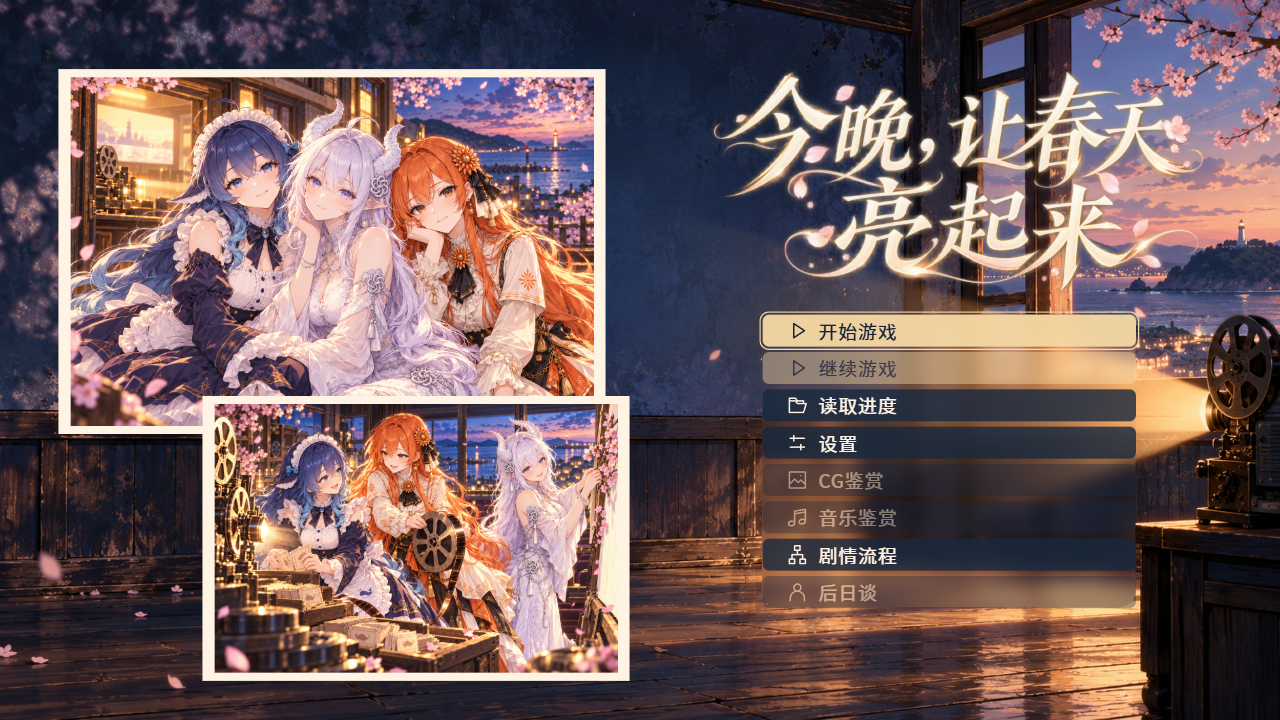

Sample tutorial: Light up spring tonight
Play Light Up Spring Tonight and restore its editable tutorial backup. Practice changing narration, character staging and the home page, then build a Web game and explore routes and afterstories.
The Spring Lights cinema closes tomorrow. You join 澜汐, 绮白 and 绯书 for the old street's final outdoor screening. Nine scenes contain a shared story, three routes and three ordinary afterstories. Chinese story text is paired with all 39 character lines in Japanese; narration and player thoughts remain silent. The Motion Canvas OP and three EDs include editable author sources. Unread text retains its original colour and read text uses a clear warm grey, with matching font and size.
Play and prepare
Play online on the Examples page and download galcraft-tutorial-0.1.1.galproject and the bilingual readme.txt from GitHub Release. Once you have it, choose Restore backup, select the file, destination parent and fresh folder name, then Create independent copy. Prepare and check dependencies before confirming. See Your first project.
Make three changes
- Change a narration line in the opening street scene. Apply, save all and play from that line to check it.
- In the preparation scene, inspect expression switches and overlapping motion. Adjust a short fade while retaining position. Use occasional reactions when the script calls for them.
- Open Home in the page designer. The memory wall, two group photos, original title artwork and menu are separate layers. Move a photo or replace the title image, then preview. A renamed copy can use its own title artwork.
Repeat the release route
Save all, select Web and a dedicated empty directory, check the saved version and build. Run node preview.mjs in the release folder. Start a new game, choose a companion and reach that route's ending. Return home and enter the unlocked ordinary afterstory. Save/load resumes a position; entering an afterstory starts it from the beginning.
Sources and terms
Continue with Pages and templates and Publishing and Player.